1
Execute Three Phases
On your turn, carry out PHASE A, PHASE B, and PHASE C in this order
2
Move Your Herder
Move your Herder at least 1 step forward on the Trail, up to your Step Limit
3
Skip Empty Spaces
Skip over any empty spaces when moving
4
Share Spaces
Multiple Herders can stop on the same space
5
Pay Farmer Fees
If you pass over any hands on Farmer Tiles, pay the amount indicated on your Player Board to the space next to the Farmer Tile; if hands are on another player's Building, pay that amount to that player instead (pay what you can if you don't have enough)
6
Use Railroad Shortcut
You may use a shortcut along the Trail to go directly to Buenos Aires if your Engine has reached or moved beyond that corresponding space on the Railroad Track
7
End at Buenos Aires
If you reach Buenos Aires, immediately end this Phase
8
Perform Location Actions
Use the Action(s) of your reached Location (actions can be performed in any order and are always optional)
9
Use Neutral or Own Buildings
On a Neutral Building or your own Buildings you may either use the Tile's Action(s) (and Risk Actions) in any order, or 1 single Auxiliary Action
10
Use Other Player's Building
On another player's Building you may only use 1 single Auxiliary Action
11
Use Farmer Tiles
On a Farmer Tile you may either HELP THAT FARMER, or 1 single Auxiliary Action
12
Resolve Buenos Aires
On Buenos Aires carry out the following 6 steps then return your Rancher to the start of the Trail
13
Step 1: Deliver to City
If you have at least 1 Disc on a Quay, you may choose to carry out 1 extra delivery to an empty space in the City belonging to that Quay; each of the 4 quarters in a City indicate the amount of Grain required to deliver there (both Quay Tiles provide a discount to that cost); pay the cost, move the Disc down to that empty space and gain any bonuses
14
Step 2: Calculate Breeding Value
Reveal your hand, sum the values of each DIFFERENT TYPE of Cattle Card; you may add to this Breeding Value with Permanent Certificates from Station Master Tiles and/or by spending temporary Certificates; gain this amount in $, return any Exhaustion Cards from your hand to the Exhaustion deck, then discard the rest of your hand
15
Step 3: Load Ships
Move 1 of your Discs from your Player Board onto a Ship with a value equal to or lower than your Breeding Value, then pay the amount of Grain indicated (reduce this amount with any permanent Grain from Station Master Tiles); for each Grain you can't pay you must pay $2; gain any immediate bonuses indicated on the Ship Tile
16
Ship Delivery Rules
Each player may deliver to each Ship only once, with the exception of the '0' and '18' Ships which may be delivered to any number of times
17
White Disc Placement
White Discs can be placed on any colour Ship/Train Station/Quay space
18
Black Disc Placement
Black Discs can only be placed on Black Ship/Train Station/Quay spaces, unless you've no White Discs left on your Player Board
19
Gain Strength Bonus
Removing your black Disc from your Strength increase area gains you $3
20
Pay Auxiliary Space Cost
The Disc removed from your lowest right Auxiliary space requires you to first pay $3
21
Handle Disc Shortage
If you need to place a Disc but can't, remove 1 of your Discs from a Train Station of your choice
22
Step 4: Select Foresight Tiles
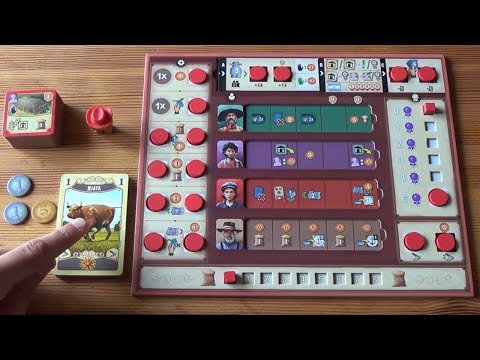
Choose 1 of the 2 Tiles in each column in the Foresight spaces, and move it to its corresponding section; Farmers must be placed on their coloured space on the Game Board as in SETUP; Workers must always be placed on the row with the Job Market Token
23
Worker Placement Effect
If you place a Worker in the space with the Job Market Token, move it down a row
24
Refill Cattle Market
If the Job Market Token passes a yellow arrow, refill the Cattle Market as in SETUP
25
Ship Departure Trigger
If the Job Market Token passes a blue arrow, the corresponding coloured Ships depart; all player Discs on these Ships are placed in their respective Quays; discard the Ships, then draw 2 new Ships and add them to the Loading Zone
26
End Game Trigger
If the Job Market Token moves off the bottom of the Game Board this triggers the end of the game; you collect it, each other player gets 1 final Turn, then perform FINAL SCORING
27
Choose Objective Cards
OBJECTIVE CARDS are chosen from either the faceup display (then reset it) or the top of the deck, and are placed into your discard pile
28
Play Objectives Strategically
Objective Cards in your hand may be played into your player area either before PHASE A, or before or after you perform an Action in PHASE B; when you do so you may perform the Immediate Action in its upper-left corner
29
Score Objectives
During FINAL SCORING you may score an Objective Card regardless of whether or not you played it into your player area during the game; however, Objective Cards that were played into your player area occur the depicted penalty if they are not fulfilled
30
Count Task Completion
Each single fulfilled Task can only count towards 1 Task on each Objective Card
31
Upgrade Train Station
When moving your Engine, if you stop in a Turnout space, you may immediately UPGRADE THE TRAIN STATION there by paying the cost and placing 1 of your Discs (each player may upgrade each Train Station one time only); you may then (and only then) remove 1 Worker Tile from any rightmost space on a row on your Player Board and put it in place of the Station Master Tile (if it is still available) to acquire it; gain its immediate bonus depicted on the top of the Tile, and keep it to use the bottom of the Tile for FINAL SCORING
32
Complete Railroad Track
On the last space of the Railroad Track your movement ends; you may then upgrade the Train Station as usual; you must then move your Engine back to the Train Depot
33
Deliver Multiple Discs
You may deliver Discs to the final space of the Railroad Track multiple times
34
Understand Engine Limits
An Engine in the Train Depot cannot move backwards
35
Select Worker
When performing this Action, choose 1 Worker Tile from the Job Market (you cannot hire any Workers from the row with the Job Market Token), pay that Worker's hiring cost, applying any modifications (if applicable) on the Action icon
36
Pay Strength Fee
If the Tile has a Strength icon then pay $1 more
37
Place Worker Tile
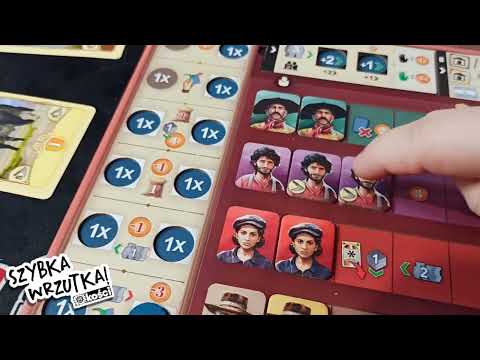
Place the Tile on the left-most available space on your Player Board; if it covers an Action you may perform it immediately or forfeit it
38
Gain Engine Upgrade
Gain $5 and upgrade 1 Station behind your Engine (If you are on the Train Depot, upgrade any Train Station behind space 24)
39
Choose Farmer Target
If you land on a Farmer you may choose to HELP that particular Farmer, otherwise this Action refers to any Farmer of your choice on the Game Board
40
Calculate Required Strength
Each Farmer has a required Strength indicated on the bottom-right of its Tile; determine your Strength by adding the Strength icons on your Player Board (you begin with a Strength of 0)
41
Add Strength Sources
Removing the White Disc from your Strength area adds 1 Strength, removing the black adds 2, and each Worker Tile you've hired with a Strength icon adds 1; you may also reveal up to 4 Cattle Cards from your hand and add the Strength to the total
42
Gain Exhaustion Cards
Revealing Cattle Cards requires you to also gain the following number of Exhaustion Cards to your discard pile: 1/2 Cattle Cards: gain 1 Exhaustion Card | 3/4 Cattle Cards: gain 2 Exhaustion Cards
43
Claim Farmer Reward
If your total Strength is equal to or higher than the Farmer's, gain its Tile and receive any $ placed next to the Tile and any amount indicated below the Tile on the Game Board
44
Score or Convert Farmer
You may either: place the Farmer next to your Player Board to count towards Objective Cards and score 2 VP during FINAL SCORING; or add it to your Player Board as a Worker: you must pay the cost, then flip it to its brown side on the left-most available space on your Player Board; you may then immediately perform the covered Action or forfeit it
45
Gain City Disc Bonus
Place 1 Disc on Quay 1 in Rotterdam or Place 1 Disc on Quay 1 in Liverpool
46
Purchase Cattle Cards
When performing this Action you acquire new available Cattle Cards by spending the indicated amount of $ depending on the number of Herders you have on your Player Board
47
Place New Cattle
Newly acquired Cattle Cards are placed on your discard pile; each Herder may only be used once during this Action
48
Limit Cattle Addition
You may instead use 1 Herder to add 2 Cattle Cards to the Cattle Market display from the Market deck
49
Select Building Location
Choose 1 of your unplaced Buildings and either place it onto any empty Building space on the Game Board, or replace 1 of your already placed Buildings
50
Pay Building Cost
Each of your Buildings has a cost in minimum number of Carpenters required on your Player Board to place it; pay the indicated $ amount on the Action icon for each Carpenter used
51
Replace Existing Building
When replacing an already placed Building, deduct the cost of the replaced Building from the newly placed 1 and pay only the difference; this allows you to place a Building using more Carpenters than you have available; then trash the removed Building from the game
52
Draw Cards
Draw up to your hand limit (4, 5, or 6) as indicated on your Player Board
53
Gain $1
Receive 1 dollar
54
Draw and Discard 1
Draw 1 of your Cards, then discard 1 Card
55
Trade Grain for Money
Lose 1 Grain, then move your Certificate Marker 1 space down, and gain $1
56
Pay for Grain
Pay $1, gain 1 Grain
57
Pay for Engine Movement
Pay $1, move your Engine forward 1 space
58
Retreat Engine
Move your Engine back 1 space, draw 1 Card, then trash 1 Card in your hand from the game
59
Gain $2
Receive 2 dollars
60
Draw and Discard 2
Draw 2 of your Cards, then discard 2 Cards
61
Trade Grain for Certificate
Lose 2 Grain, then move your Certificate Marker 2 spaces down, and gain $2
62
Pay for More Grain
Pay $2, gain 2 Grain
63
Pay for More Engine Movement
Pay $2, move your Engine forward 2 spaces
64
Retreat Engine Further
Move your Engine back 2 spaces, draw 2 Cards, then trash 2 Cards in your hand from the game